How FermiLink Works
FermiLink is designed to be agnostic to AI agent providers, scientific packages, and your computing environments.
You choose your favorite agent provider (e.g., OpenAI Codex, Anthropic Claude, Google Gemini, or OpenCode) and FermiLink will rely on it for reasoning and decision-making.
The built-in 150+ scientific package knowledge bases provide the agent source-grounded rich context for reasoning. You can also create custom knowledge bases by yourselves using
fermilink compile.FermiLink focuses on providing a set of advanced workflows (
exec,loop,research,reproducefor simulations andoptimizefor code optimization) specifically designed for scientific computing.FermiLink works on your laptop, workstation, HPC cluster, or even your phone via Telegram.
So we can focus on the science.
The goal.md interface
For users, all we need to do is to provide a goal, either typed at the command line
or written in a goal.md file. The goal describes what to compute, not
how. FermiLink figures out the how:
# Pass a goal file
fermilink loop goal.md

# Or type directly
fermilink exec "Compute the phonon dispersion of silicon using Quantum ESPRESSO"
For longer or multi-step work, writing a goal.md file is recommended.
See Writing a goal.md for the full format guide.
Three autonomous simulation workflows
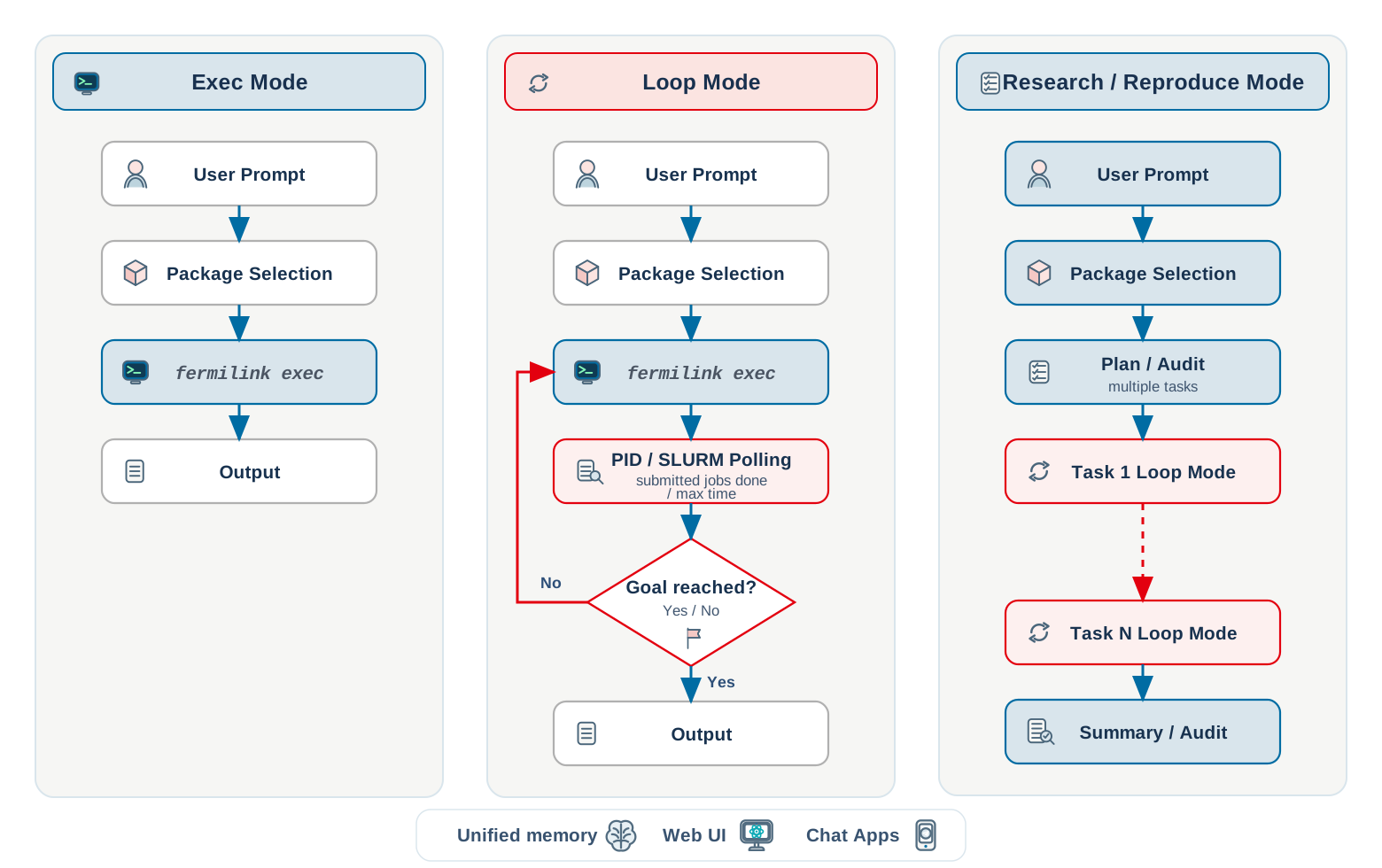
FermiLink provides three workflows for autonomous scientific simulations:
exec – one prompt, one agent run. Best for quick tasks that finish in under 30 minutes (e.g., plotting data, short calculations).
loop – autonomous iteration with persistent memory, local PID or SLURM job monitoring. Best for tasks that run for hours or days with iterative job submissions.
reproduce – deterministic planner + auditor + task-loop orchestration for publication-scale campaigns whose target is known up front (e.g., reproducing all figures from a paper, running a full parameter sweep).
research – exploratory orchestration for open-ended questions where the right approach is not known in advance. It generates a general research charter (central question, competing approaches, risks and fallbacks, success/kill criteria), then runs an explore → reflect → re-plan phase loop that may pivot the approach or hypothesis (or declare an honest negative result) between phases, and finally writes a submission-ready paper (Markdown + RevTeX + PDF). Probes may run as scientific simulations (
loop), write-code-from-scratch (loop), analytical derivations (drvloop), or, when explicitly enabled with--enable-exploop, experimental measurements (exploop).
Choose based on timescale and complexity:
Can it finish in one agent turn? Use
exec.Does it need iteration or long waits? Use
loop.Is the target known and you want it reproduced deterministically? Use
reproduce.Is the question open-ended and exploratory? Use
research.
Scientific package knowledge bases
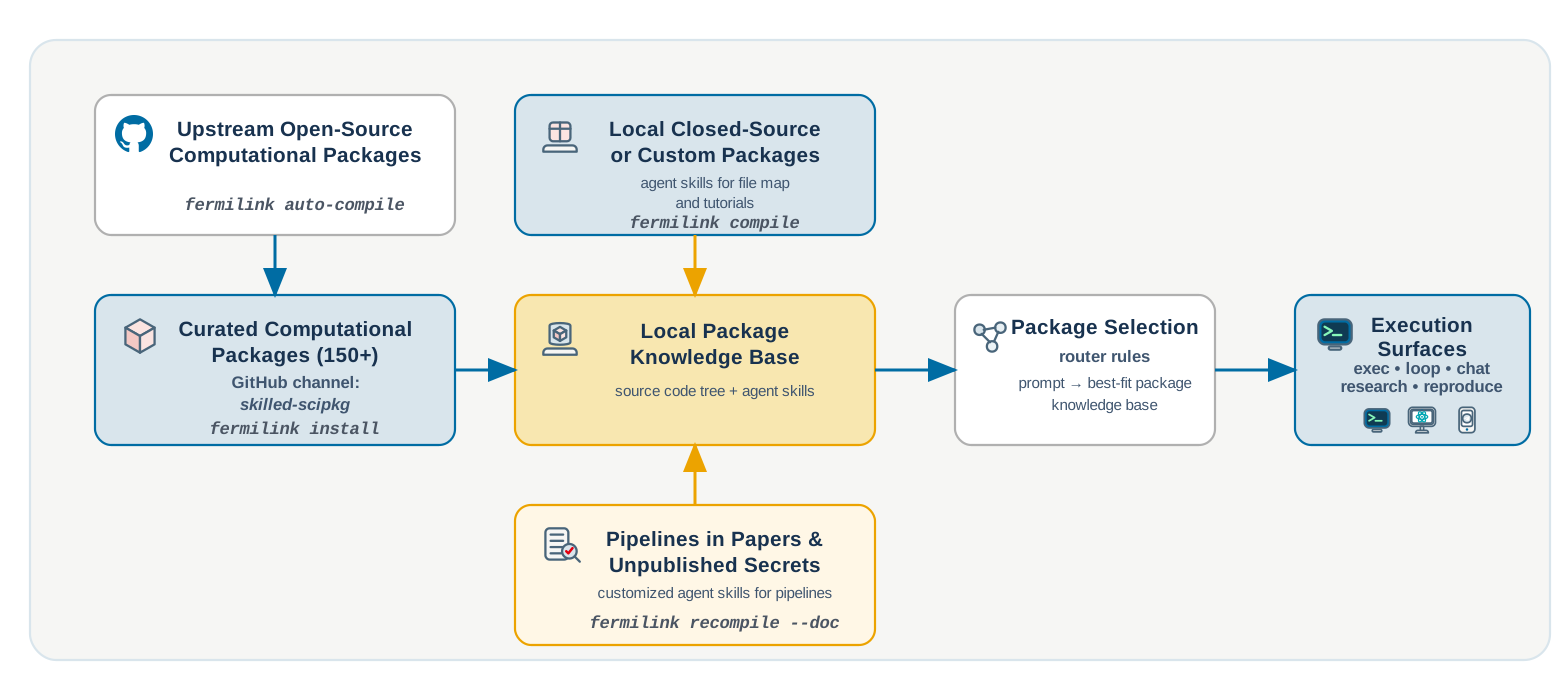
FermiLink ships with 150+ built-in scientific package knowledge bases spanning computational chemistry, materials science, photonics, fluid dynamics, and more. Each knowledge base includes:
The full source-code tree of the package
Agent Skills – curated entry-level tutorials and informative file maps that help the AI agent efficiently navigate the package
When you install a package (fermilink install meep), FermiLink makes this
knowledge available to the agent during all sessions.
You can also create knowledge bases for your own code:
fermilink compile /path/to/my-code          # create from source
fermilink recompile my-code                 # update after changes
See install: Built-In Scientific Package Management for the full package management guide.
Three ways to interact
FermiLink is not just a CLI tool. Pick the interface that fits your workflow:
Command line –
fermilink exec/loop/research goal.mdfor headless, scriptable autonomy. The most powerful interface.Web UI –
fermilink startlaunches a ChatGPT-style browser interface for interactive sessions.Telegram bot –
fermilink gatewayconnects to Telegram so you can run and monitor jobs from your phone.
Unified memory
FermiLink maintains a projects/memory.md file in each workspace that
persists across iterations and sessions. The memory includes both
Short-term state
Long-term knowledge
This memory allows the agent to resume work after interruptions as well as learn from its past successes and failures.
Beyond simulations: autonomous code optimization
Once simulations are taken over by FermiLink, the next bottleneck is often code performance.
The latest version of FermiLink also supports autonomous code optimization, where it can identify performance bottlenecks and optimize them iteratively using deterministic benchmarks.
See Tutorial: Code Optimization for the full guide on autonomous code optimization with FermiLink.
What’s next
Quickstart – install and run your first goal in 5 minutes
Writing a goal.md – how to write effective goal files
Tutorial: Code Optimization – autonomous code optimization
Architecture – full runtime flow and module contracts