Installation
This page covers all installation options. For the shortest path from zero to running, see the Quickstart.
Laptop / workstation users: see also the Tutorial: Laptop Simulations for a hands-on walkthrough.
HPC users: see also the Tutorial: HPC Simulations for SLURM-specific setup.
FermiLink is designed to run on a wide range of environments:
Command-line interface (CLI), see Command Line Tools;
Web UI for interactive use on laptops and workstations, see Web UI;
Telegram bot for remote control from your phone; see Chat Apps.
For detailed guidance on choosing the right provider for your needs, see Choosing an AI Agent.
Light-weighted usage of FermiLink
A light-weight way for using FermiLink is available now.
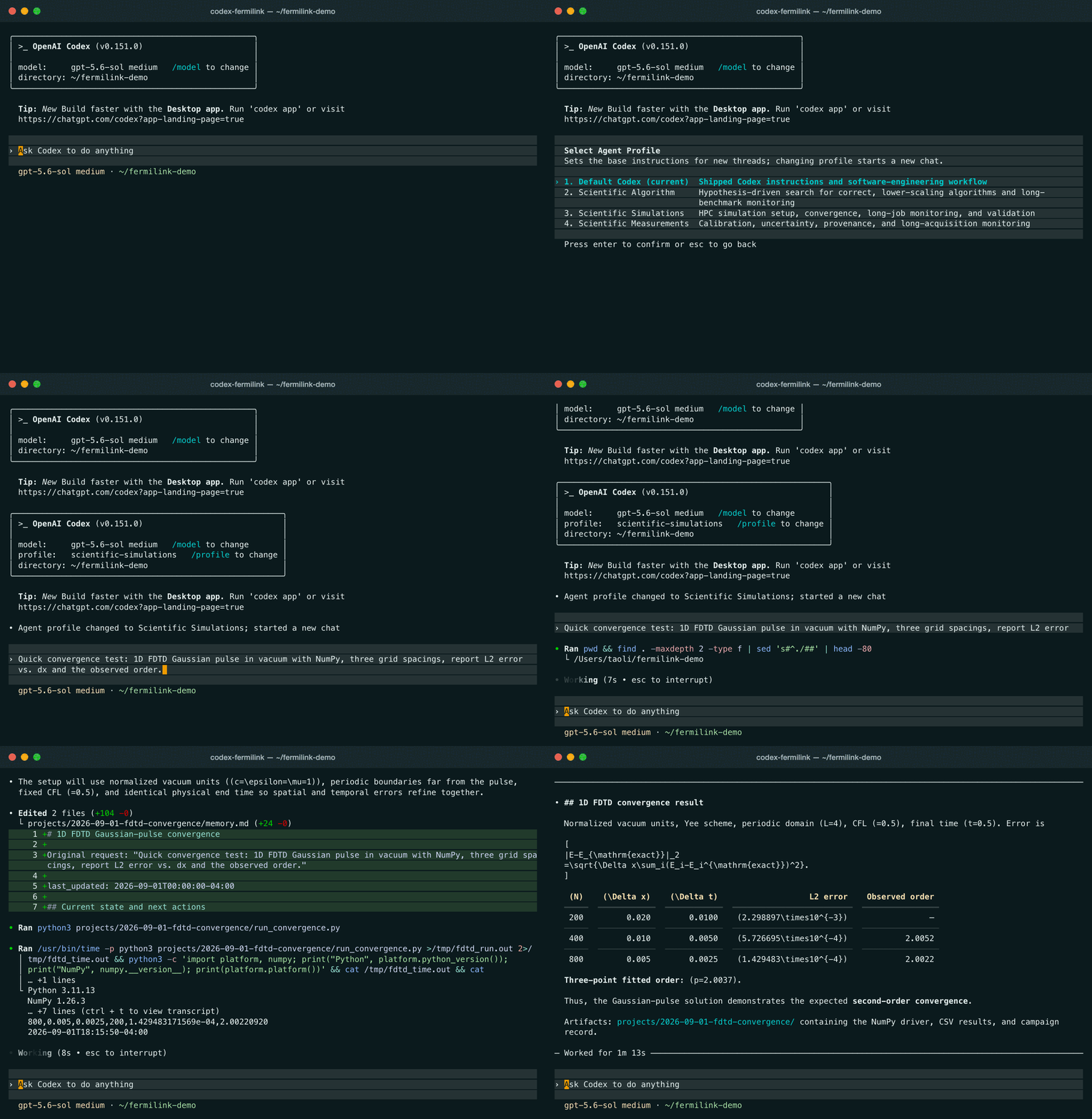
codex-fermilink now brings the FermiLink harness within codex, so we can run FermiLink workflows with the same user experience as the original Codex CLI.
Install and try it now:
npm install -g @tel-research/codex-fermilink
codex-fermilink      # then type /profile for using scientific workflows.
Prerequisites
Beyond this light-weighted usage, here are the steps to install and use the full FermiLink harness.
FermiLink assumes a standard local developer environment:
Python
>= 3.11gitonPATH(workspaces are git repos)Node.js +
npm(commonly used for local agent provider CLIs) orhomebrewinstalled for MacSupported provider CLI on
PATH: Codex (codex), Claude (claude), Gemini (gemini), or OpenCode (opencode)
Note
For HPC users without sudo access, you need to install Node.js and npm locally first.
Install provider CLI (Codex, Claude, Gemini, or OpenCode)
# Codex option
npm i -g @openai/codex  # Use ``brew install codex`` for Mac
Apart from OpenAI Codex, users can also install Claude, Gemini, or OpenCode from each provider’s official distribution.
OpenCode is useful if you want FermiLink to connect through a single CLI
to a wider range of third-party model providers. Configure the provider/model
profiles in OpenCode first, then select opencode in FermiLink with a
model name in provider/model form. This lets you use OpenCode-backed
providers such as DeepSeek and other supported services without requiring a
separate FermiLink adapter for each one.
Provider authentication
Authenticate the provider you selected before starting web UI services or running
fermilink exec/chat/loop/research/reproduce.
Example login commands:
# Codex
codex login
# Claude
claude
# Gemini
gemini
# OpenCode
opencode auth login
Install FermiLink
You can install FermiLink with pip:
pip install fermilink
Quick check:
fermilink --help
On Windows, pip installs the fermilink.exe launcher into the active
Python environment’s Scripts directory. If PowerShell or cmd.exe says
fermilink is not recognized, the install may still be valid but that
Scripts directory is not on PATH. You can run the same CLI without
changing PATH. In an activated conda or virtual environment, use:
python -m fermilink --help
python -m fermilink install meep --activate
Install your first scientific package knowledge base
FermiLink routes each request to a scientific package knowledge base. Install at least one package before your first run.
# discover availability in the default curated channel (https://github.com/orgs/skilled-scipkg/repositories)
fermilink avail meep

# install one or more packages
fermilink install meep --activate
fermilink install lammps

# verify locally installed packages
fermilink list
--activate sets the default package for new sessions. You can switch later
with fermilink activate <package_id>.
fermilink install downloads the package knowledge base (source code tree
+ agent skills). It does not install the package for execution.
It is recommended that users have the actual software already installed on
their machines, but the agent can install packages on its own if needed.
Agent runtime policy
By default, agents run in a sandbox that restricts file-system and network access. Some scientific simulations (e.g., MPI jobs, access to external data) require bypassing the sandbox. You can do this per-provider:
# show current policy
fermilink agent --json

# enforce sandbox mode (default), codex provider
fermilink agent codex --sandbox --model gpt-5.3-codex --reasoning-effort xhigh

# bypass sandbox (which might be needed for local MPI jobs)
fermilink agent codex --bypass-sandbox --model gpt-5.3-codex --reasoning-effort xhigh

# bypass sandbox for claude
fermilink agent claude --bypass-sandbox --model sonnet --reasoning-effort high

# bypass sandbox for gemini
fermilink agent gemini --bypass-sandbox --model auto-gemini-3 --reasoning-effort high

# bypass sandbox for opencode
fermilink agent opencode --bypass-sandbox --model openai/gpt-5.5 --reasoning-effort xhigh
Warning
When fermilink agent --bypass-sandbox is needed for maximal functionality, NEVER run it as a root user.
See Choosing an AI Agent for the latest support of agent providers.
Developer mode
Install from source if you want to modify FermiLink or contribute:
git clone git@github.com:TaoELi/FermiLink.git
cd FermiLink
pip install -e ".[dev]"